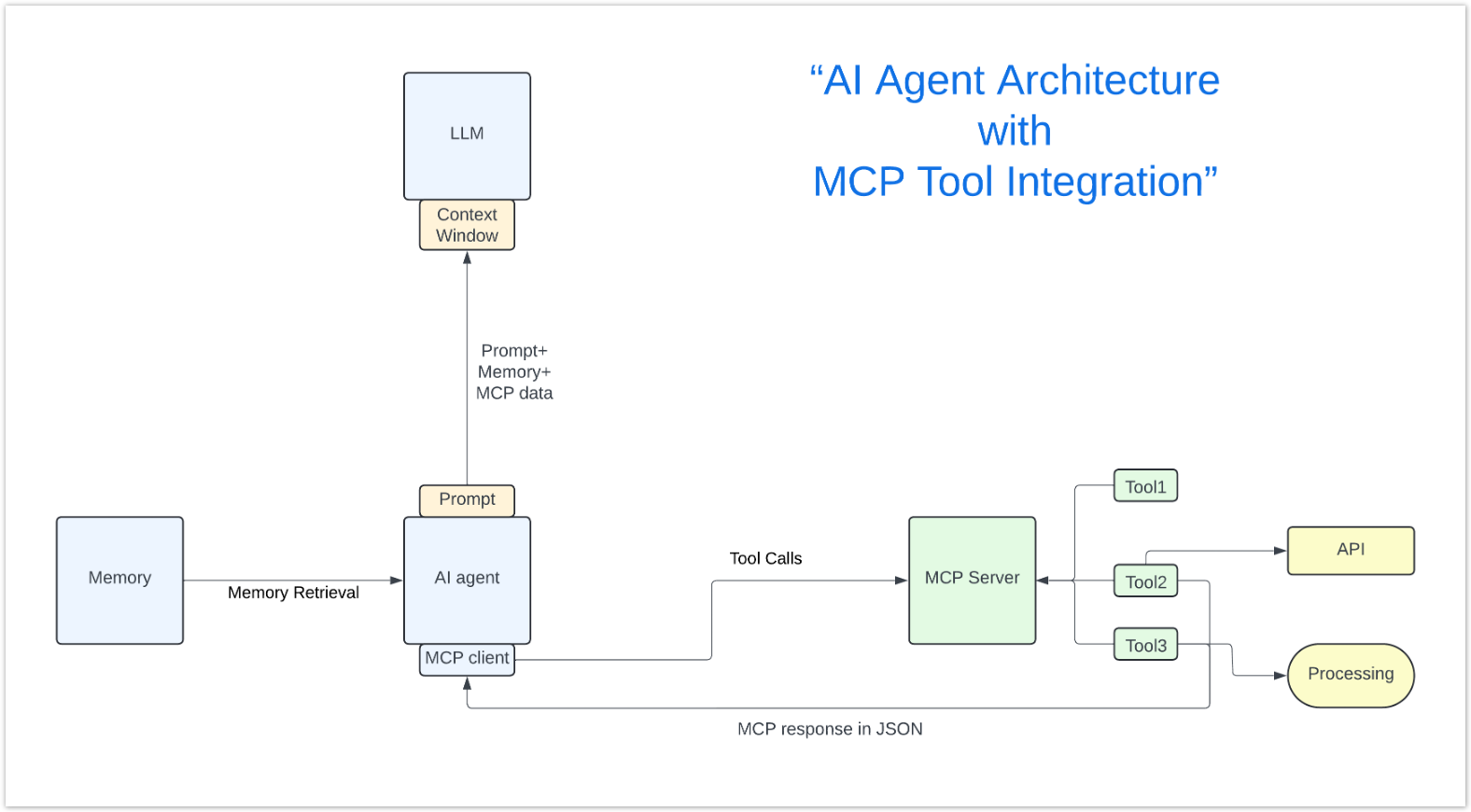
The Model Context Protocol (MCP) is an open-source standard for connecting AI applications to external systems like data sources, tools, and workflows. The AI agent incorporates MCP tool responses into the LLM's context window, allowing the model to reason over new information. Think of it as a standardized way for your AI applications to talk to virtually any service or dataset, eliminating the need for everyone to build custom connections their own way. The Science Cloud Research and Innovation team has been developing proof-of-concept MCP implementations for the past 4 to 5 months, building expertise in deployment, testing, and real-world applications.
Key benefits for Science Cloud users:
Access through Science Cloud services:
The Science Cloud maintains a repository with multiple proof-of-concept implementations, including servers for HIS archive and other specialized applications. The team has also developed tutorials for FastMCP version 2, the new SDK that explains how to build MCP servers from scratch.
Multiple official SDKs are available for building MCP servers, with FastMCP for Python being particularly popular for development. All SDKs build servers that listen on specific ports using STDIO or Streamable HTTP protocols.



Development approaches:
Authentication and authorization: MCP includes built-in support for authentication and authorization, integrating with standard identity providers and security frameworks used in enterprise environments.
The Science Cloud offers multiple deployment strategies based on your needs:
Local deployment:
Cloud-native options:
Open-source solutions:
For development and testing, the Science Cloud provides access to several key tools:
MCP Inspector for debugging:
npx @modelcontextprotocol/inspectorResearch Platform integration: The Science Cloud's Research Platform has been the preferred testing environment, offering Jupyter hub with an AI extension that allows you to connect to MCP servers and interact with built-in agents using natural language. This platform has proven invaluable for experimenting with multiple MCP servers and agents simultaneously.
The Science Cloud team has implemented several practical examples, including a USGS real-time flood impact API server. These implementations demonstrate how MCP can connect AI agents to live data sources and specialized scientific tools.
Common patterns emerging from implementation:
Through months of testing and implementation, several critical insights have emerged:
Key performance considerations:
The "code mode" approach: Instead of having content go back and forth to the LLM (consuming tokens and costing money), agents can write and execute code that calls tools directly. For example, rather than calling a database tool, getting content, sending it back to the LLM, then calling a website tool, the agent writes code that connects to the database and dumps content to the website in one operation.
Additional optimization features:
Important security note: An untrusted MCP server becomes an untrusted plugin for your AI agent, with all the risks of installing unknown software. The Science Cloud team emphasizes careful evaluation and proper security protocols when deploying MCP servers.
Best practices:
Science Cloud resources:
Important links:
MCP Server Development
Code Mode, MCP Servers at Scale
MCP Deployment
The Science Cloud team continues to develop new MCP implementations and is available to assist with your specific use cases and deployment needs.
While MCP in the Science Cloud is currently in the proof-of-concept stage and not yet ready for use, there are several steps you can take to prepare your workflows for future MCP integration. Start by exploring the proof-of-concept repository to understand existing implementations and see how other researchers have approached similar challenges. Next, identify APIs or data sources in your current research workflows that could benefit from MCP integration—look for repetitive data access patterns or systems that would benefit from AI-powered automation. If you have existing well-documented APIs, consider improving your OpenAPI documentation as this will provide the fastest path to a working MCP server when the capability becomes available. Finally, use the Research Platform for testing and development, taking advantage of its Jupyter environment to experiment with concepts that will later integrate with MCP.
For additional support or questions about MCP on Science Cloud, contact Ramon Ramirez-Linan (Research and Innovation Lead) at ramon.e.ramirez-linan@nasa.gov, or reach out through the Science Cloud Help Desk at support@sciencecloud.nasa.gov.