This guide outlines the cost and billing model for using the NASA Science Cloud. To help teams focus fully on their research, the Office of the Chief Science Data Officer (OCSDO) fully funds the Science Cloud's underlying infrastructure, platform management, and Authority to Operate (ATO). However, individual projects are financially responsible for the specific compute, storage, and software resources they choose to consume. This article breaks down exactly how billing works, which services are provided at no cost, which services are pay-for-usage, and how standard fees and discounts are applied to your project's budget.
1. The "Project" Concept & Cost Model
Most usage of the Science Cloud is based on the concept of a "project." A project could be one or more people sharing a GitLab repository, or a team using the cloud to develop and deliver services/data via a commercial cloud provider account.
Core Financial Principle: Projects are only charged for the specific services they use.
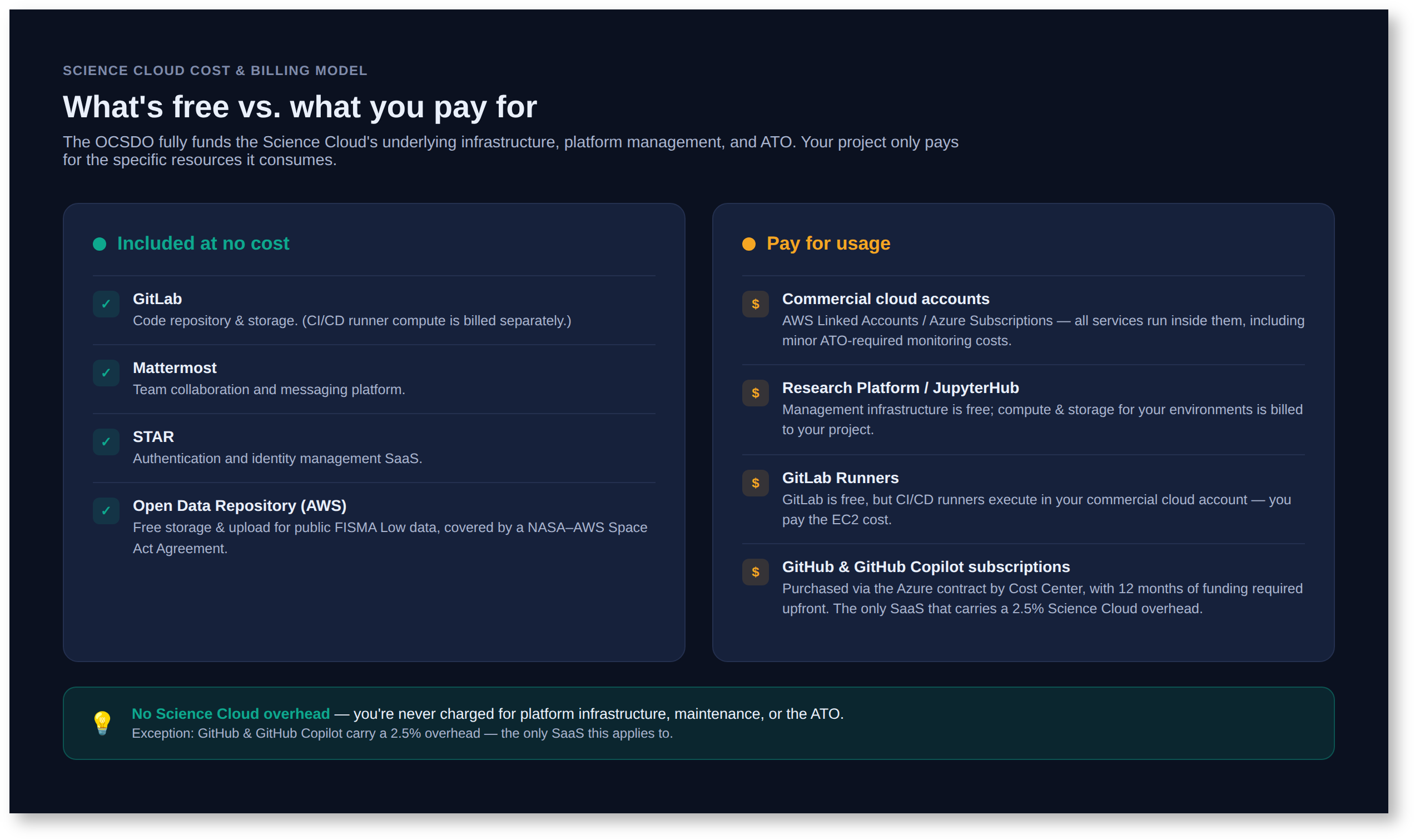
• No Science Cloud Overhead: There is no overhead charge added to cover the costs of Science Cloud infrastructure development, maintenance, support operations, financial reporting, or the Science Cloud's ATO. These are fully funded by the OCSDO. (Note: See the GitHub and CCS sections below for specific third-party/OCIO fees).
2. Services Provided at No Cost
The following services are provided to Science Cloud projects free of charge, supported by the OCSDO:
- GitLab (Code Repository & Storage): Services and storage to manage code development and maintenance are provided at no cost. (Note: Compute costs for CI/CD runners are the project's responsibility).
- MatterMost: Team collaboration and messaging platform provided at no cost.
- STAR: Software as a service for authentication/identity management provided at no cost.
- Open Data Repository (AWS): Free access and upload capabilities for FISMA Low data identified as valuable to the public. Storage costs are covered by a Space Act Agreement between NASA and AWS.
3. Pay-for-Usage Services
Projects are financially responsible for the direct computing and cloud resources they consume.
- Commercial Cloud Accounts (AWS Linked Accounts / Azure Subscriptions): Projects pay for all services that run within their commercial cloud accounts. This includes minor costs for EC2 and storage monitoring required by the Science Cloud's ATO, as well as the usage of native tools like AWS Cost Explorer or QuickSight.
- Research Platform (RP) / JupyterHub: The RP is a JupyterHub SaaS offering running in an OCSDO-funded EKS cluster. While the underlying management infrastructure is free, projects pay for the specific compute and storage services they use for their individual/shared JupyterHub environments.
- GitLab Runners: While GitLab itself is free, runners used for CI/CD pipelines must be executed in a commercial cloud account, and the project pays for the associated EC2 instance costs.
4. Software Licensing & Specialized Support
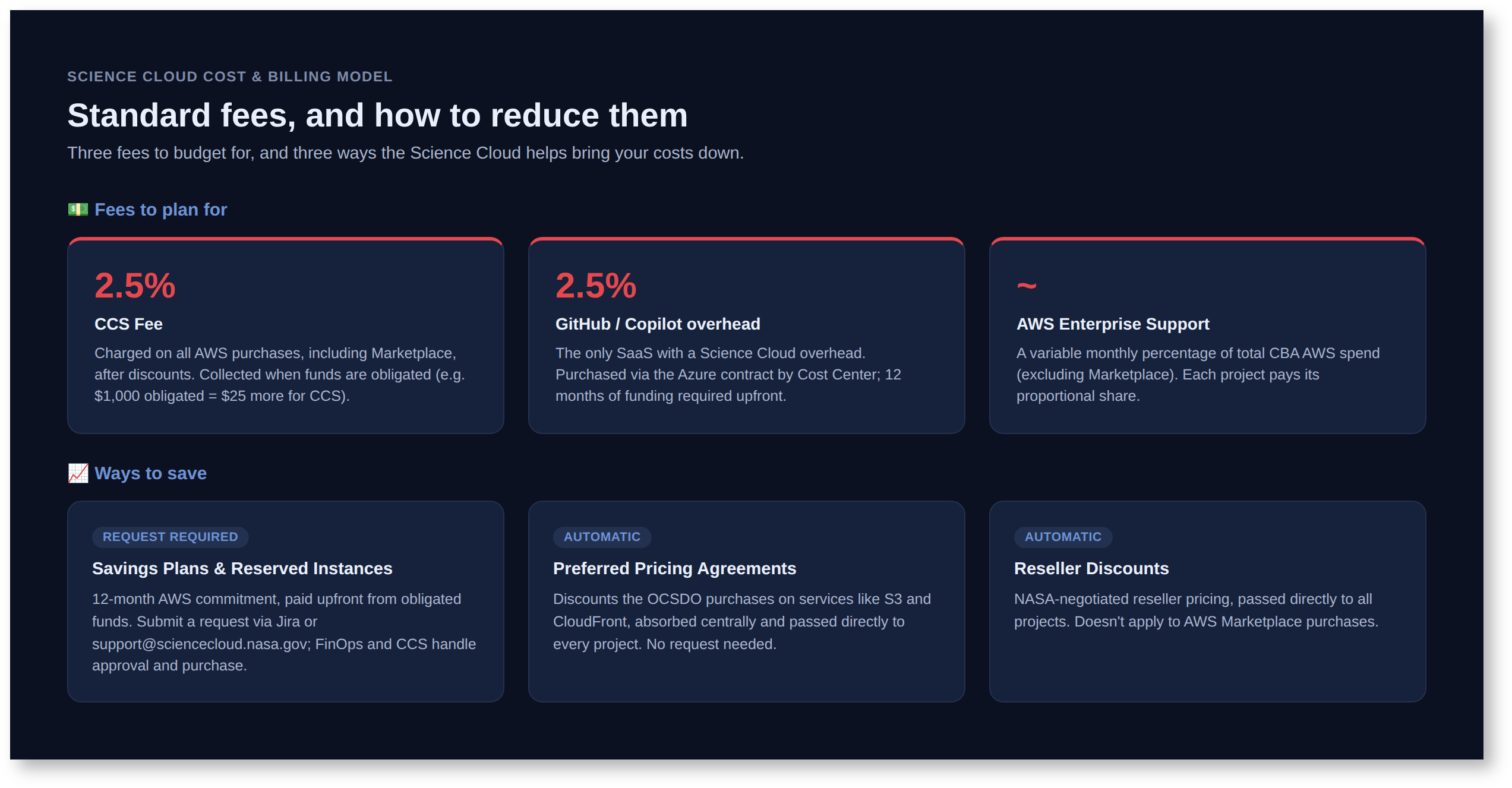
- GitHub and GitHub Copilot: This is the only Software as a Service (SaaS) for which the Science Cloud charges a 2.5% overhead. Subscriptions are purchased through the Azure cloud contract and organized by Cost Centers. All costs are the responsibility of the Cost Center, and 12 months of funding is required upfront to start a subscription.
- Science Cloud Direct Project Support (DPS): Projects requiring committed personnel support (e.g., short or long-term parallel cluster support, specialized efforts) can request this on an individual basis. DPS is billed at a fixed rate of $150/hour.
5. Cost Optimization: Savings Plans & Discounts
- Savings Plans and Reserved Instances (AWS): Projects can purchase 12-month AWS Savings Plans or Reserved Instances to lower compute costs. These cannot be purchased directly through the AWS Console.
- Prerequisites: Purchases require a 12-month commitment, full payment upfront, and funds must already be obligated and allocated to your project.
- Request Process:
- The Project PI or Financial POC must submit a request ticket via the Jira Support Portal or by emailing support@sciencecloud.nasa.gov.
- Science Cloud Financial Operations will work with you to identify the specific instance types, regions, and compute requirements you wish to reserve, and to verify available obligated funds.
- FinOps will then route the request to Cloud Computing Services (CCS) for final purchase approval and execution.
- Preferred Pricing Agreements: OCSDO purchases Preferred Pricing Agreements from AWS to reduce costs for services like S3 and CloudFront. The OCSDO absorbs the cost of these agreements, and the lower pricing is passed directly to all Science Cloud projects. No formal request is needed; this is applied automatically.
- Reseller Discounts: NASA negotiates special pricing and discounts with resellers. These savings are passed directly to all projects (Note: discounts do not apply to Marketplace purchases).
6. Overhead Fees & Support Costs
When calculating budgets, projects must account for these standard OCIO/Vendor fees:
- Cloud Computing Services (CCS) Fee: CCS (a service line in the OCIO's Operations Division) charges a 2.5% overhead fee on all services purchased from AWS, including AWS Marketplace purchases. This fee is calculated after all discounts are applied and is collected at the time funds are obligated. (Example: Obligating $1,000 to the AWS contract requires obligating an additional $25 to cover the CCS support contract).
- AWS Enterprise Support: NASA maintains an Enterprise Support contract for the AWS Cloud, allowing users with console access to request cloud support directly from AWS. This cost fluctuates monthly based on a percentage of total Centralized Billing Account (CBA) AWS costs (excluding Marketplace). Each project pays its proportional share of this Enterprise Support percentage based on its monthly AWS spend.