
| Info |
|---|
Read time: 6 minutes. Short version: JupyterLab has a built-in AI SI assistant. You choose which AI SI model it talks to. You can bring your own, buy a GitHub Copilot seat through the Science Cloud, or ask to join the pilot for the Science Cloud's own model. |
...
Notebook Intelligence is the AI SI assistant built into your workspace. It is not a separate web page. It sits next to your notebook.
An LLM (large language model) is the AI SI model that answers. Notebook Intelligence is the part in JupyterLab; the LLM is the brain it talks to. You choose the brain.
...
Coming later. Running models through the AI SI Registry, and through AWS Bedrock. Not available today.
...
- In JupyterLab, open the assistant's chat panel.
- Click the gear icon. (Or use Settings → Notebook Intelligence Settings.)
- Choose the provider type from the list above.
- Fill in what it asks for — usually a model name, an address, and an API key.
- Save. Then ask the assistant a question to check it works.
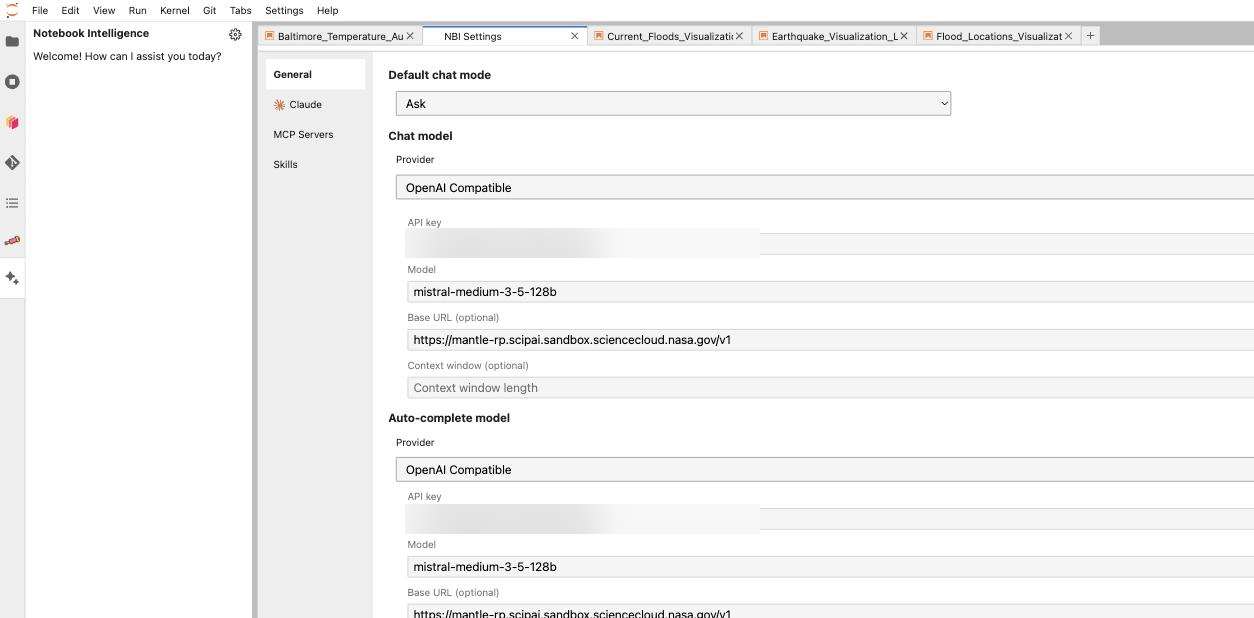
The NBI Settings tab: pick a provider, then enter the model, the address, and the API key. The key fields in this picture are blurred.
GitHub Copilot is different: you sign in to GitHub instead of pasting a key. You can tick "Remember my GitHub Copilot access token", which stores an encrypted token in ~/.jupyter/nbi/user-data.json.
...