
Topics
Acronyms
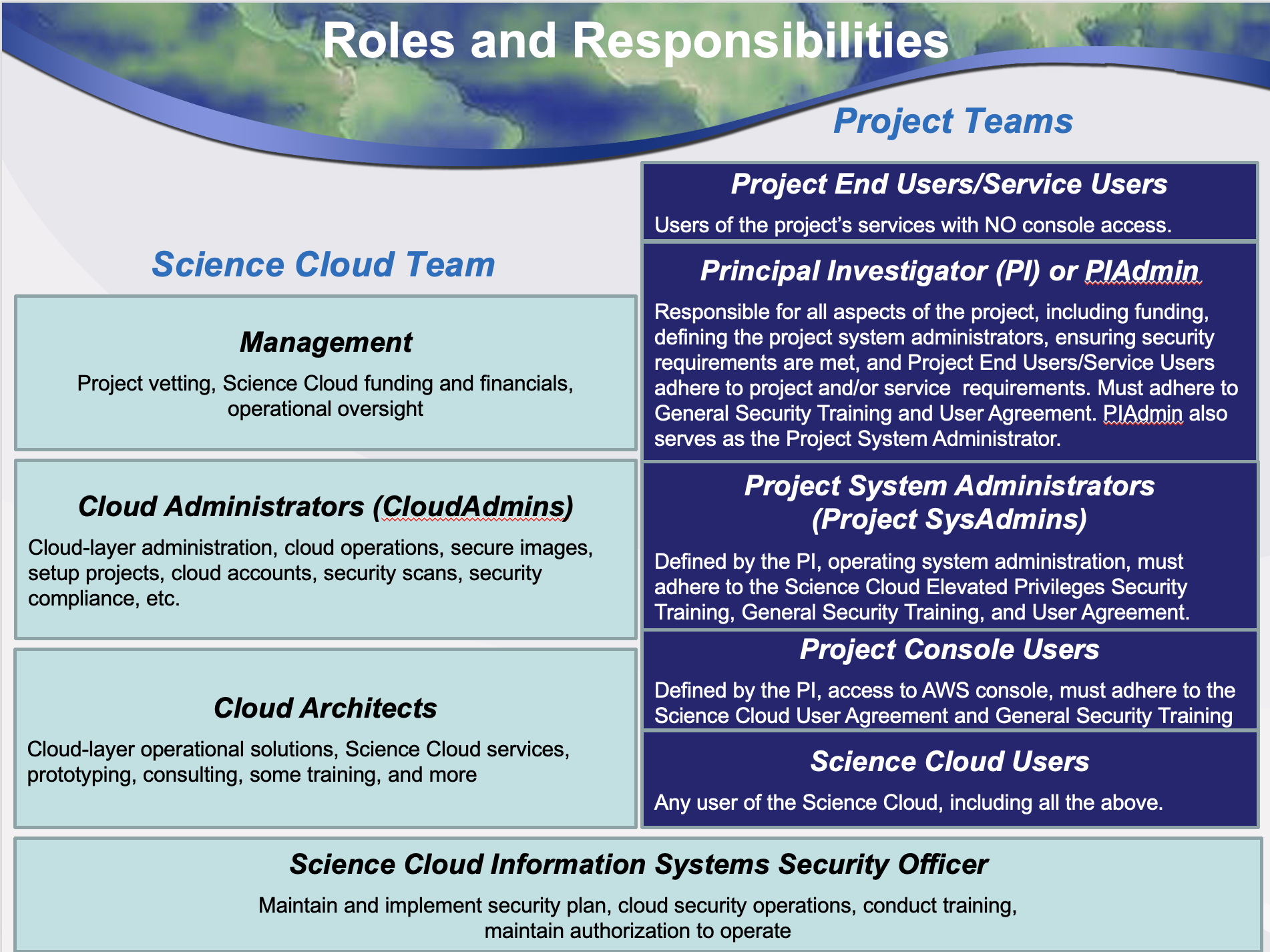
Roles and Responsibilities
User Agreements and Training Requirements
Authorization and Access
Shared Security Model
User ID, Password, and Key Expirations
Allowable Types of Data
Systems Manager and Inspector
Backups and Disaster Recovery
Incident Response
User Agreement Attestation
Project Console User Training
Acronyms
ACG | A Cloud Guru | IAM | Identity and Access Management | |
AMI | Amazon Machine Image | ISSO | Information Systems Security Officer | |
API | Application Programming Interface | ISSE | Information Systems Security Engineer | |
ATC | AWS Training and Certification | ITAR | International Traffic in Arms Regulations | |
AVM | Azure Virtual Machine | MAR | Mitigation Action Requirement | |
AWS | Amazon Web Services | MFA | Multi-Factor Authentication | |
CIS | Center for Internet Security | NIST | National Institutes of Standards and Technology | |
CUI | Controlled Unclassified Information | PI | Principal Investigator | |
CVE | Common Vulnerabilities and Exposures | RHEL | Red Hat Enterprise Linux | |
CSET | Cyber Security Engineering Team | S3 | Simple Storage Service | |
DHS | Daily Health Status | SA | Systems Administrator | |
EC2 | Elastic Compute Cloud | SCRM | Supply Chain Risk Management | |
ECR | Elastic Container Registry | SLES | SUSE Linux Enterprise Server | |
FISMA | Federal Information Management Security Act | SOC | Security Operations Center | |
KEV | Known Exploited Vulnerabilities | SSM | Systems Manager |
User Agreements and Training Requirements
Agreement or Training Module | Who Should Take This | Time Frame |
User Agreement | All console users | Annually |
General Security Training | All console users | Annually |
Elevated Privileges Security Training | PIAdmin, Project SysAdmins, CloudAdmins | Annually |
- Training is designed to help users understand current NASA security requirements and how they impact the operation of the Science Cloud
- All Users will need to work together with the Science Cloud CloudAdmin Team to implement good security practices
- Security is everyone’s responsibility!
Authorization and Access
- All Console access requests must go through the PI, PIAdmin, or Project SysAdmin for approval.
- Access to be granted by the Science Cloud team to online Security Training and User Agreement
- Initial credentials will be provided to users by their PI, PIAdmin, Project SysAdmin, or one of the Science Cloud CloudAdmins after the required training(s) and User Agreement have been completed.
- The use of Multi-Factor Authentication (MFA) is required for all Console Access and all interactive applications hosted on the Science Cloud
- Applications that are not MFA-compliant must be part of a documented exception.
User ID, Password, and Key Expirations
- All passwords (for both AWS/Azure Consoles and Applications) must meet ”strong” password guidelines, which requires:
- A minimum of 12 characters
- Each of the following character types:
- Uppercase
- Lowercase
- Numbers
- Special characters (! @ # $ % ^ & * () <> [] {} | _+-=)
- Passwords should be different from your AWS account name or email address
- Passwords should never be written down
- AWS/Azure Console Passwords and API Keys must be changed every 60 days or sooner, or they will be disabled
- API Keys must never be stored in a publicly-available repository
- Applications that are not compliant with these guidelines must be part of a documented exception
Shared Security Responsibility Model
Layer | Science Cloud Support Team | Project System Administrators |
Application Layer |
|
|
Container Layer |
|
|
O/S Layer |
|
|
Cloud Layer |
|
|
Physical Layer |
| |
Allowable Types of Data
- Data in Science Cloud must be categorized as Federal Information Security Management Act (FISMA) Low or Moderate
- Science Cloud is approved for both FISMA Low and Medium, and is appropriate for the storage and processing of public data that is openly available
- Uploading of classified, EAR, or ITAR data to the Science Cloud is strictly prohibited
- Storage of CUI is allowed provided it is protected via encryption in transit and at rest
Systems Manager and Inspector
- For AWS implementations, the AWS Systems Manager agent (SSM) must be installed on all EC2 instances
- AWS provides instructions for installing the SSM agent on all AWS supported operating systems at the following URL:
- https://docs.aws.amazon.com/systems-manager/latest/userguide/sysman-manual-agent-install.html
...
Note: EC2 instances without the SSM agent will need to be updated or will be automatically shut down after 7 days
Backups and Disaster Recovery
- Backups of data and disaster recovery are the responsibility of the PI, PIAdmin, and/or Project SysAdmins for each project
- PIs, PIAdmins, and/or Project SysAdmins are encouraged to have a backup strategy for data stored within their individual project resources to ensure that regular backups are conducted
- The absence of a backup strategy is suitable if the PI is OK with the potential loss of data due to unforeseen system outages
- PIAdmins and/or Project SysAdmins should backup both the configuration and data for all AWS and Azure instances prior to any major system upgrades
Incident Response
- If a security incident occurs, Science Cloud users will be required to fully and immediately cooperate with the Science Cloud ISSO, CloudAdmins, and Management Team
- If you think a security incident has occurred (or is occurring), Science Cloud users shall:
- Leave systems as is and not terminate any instances
- Immediately contact the NASA SOC, Science Cloud ISSO, or CloudAdmin team
- Be available to perform any necessary remediation activities
- Retake the annual Science Cloud security training and User Agreement
- To assist NASA Security Operations Center (SOC) personnel, Science Cloud users will need to be available to respond to requests
User Agreement Attestation
- The Science Cloud User Agreement:
- Describes the security-related responsibilities and expected user behavior for each type of user
- Promotes good security practices by ensuring the confidentiality, integrity, and availability of all Science Cloud resources
- Assures that Science Cloud users with AWS console access have read and understand the Security training modules and the compliances to which are required for the type of access to be granted
- All Science Cloud users with AWS or Azure console access must attest to the User Agreement prior to accessing any Science Cloud resources, and annually thereafter
Project Console User
...
Training – Requirement for MFA
- For compliance with the Science Cloud security profile, all users will need to use Multifactor Authentication (MFA) when logging into AWS or Azure
- NASA-badged users will login with their NASA PIV card credentials which automatically inherits the required MFA capabilities
- Users without a NASA badge will need to be setup using their Azure EntraID entity, which can be from their company, educational institution, or other organization
Project Console User Training – Leveraging AWS Roles
- Most secure approach for enabling access to any type of AWS resources is via the use of Roles, rather than using API Keys
- For processes that will occur entirely within the AWS Ecosystem, IAM roles can be assigned to EC2 instances and other AWS services to provide required access.
- Uses the same granular security model throughout IAM, so permissions can be specified narrowly
- Benefits include
- Key rotation is handled automatically
- No need for MFA or security exceptions/service accounts for automated processes
- Cannot be used for processes that run outside AWS, like copying data from a local device to an S3 bucket. This will still require a service account (and a documented security exception).
Project Console User Training – AWS Cost Monitoring
- AWS provides several tools to allow any Console User to monitor current expenditures in AWS for a particular project
- AWS Cost Explorer allows for display of project costs by service, by month
- AWS Budgets can be used to set up custom budget alerts when a cost threshold has been exceeded
- AWS Cost Calculator can help you predict costs before you deploy a solution (this does not require console access):
Project Console User Training – Data Allowed in Science Cloud
- Open Data only (publicly accessible, non-proprietary)
- No EAR
- No ITAR
- CUI is allowed but must be encrypted in transit and at rest
- FISMA Low or Moderate data
- All AWS commercial services allowed in US regions
...