
...
Acronyms
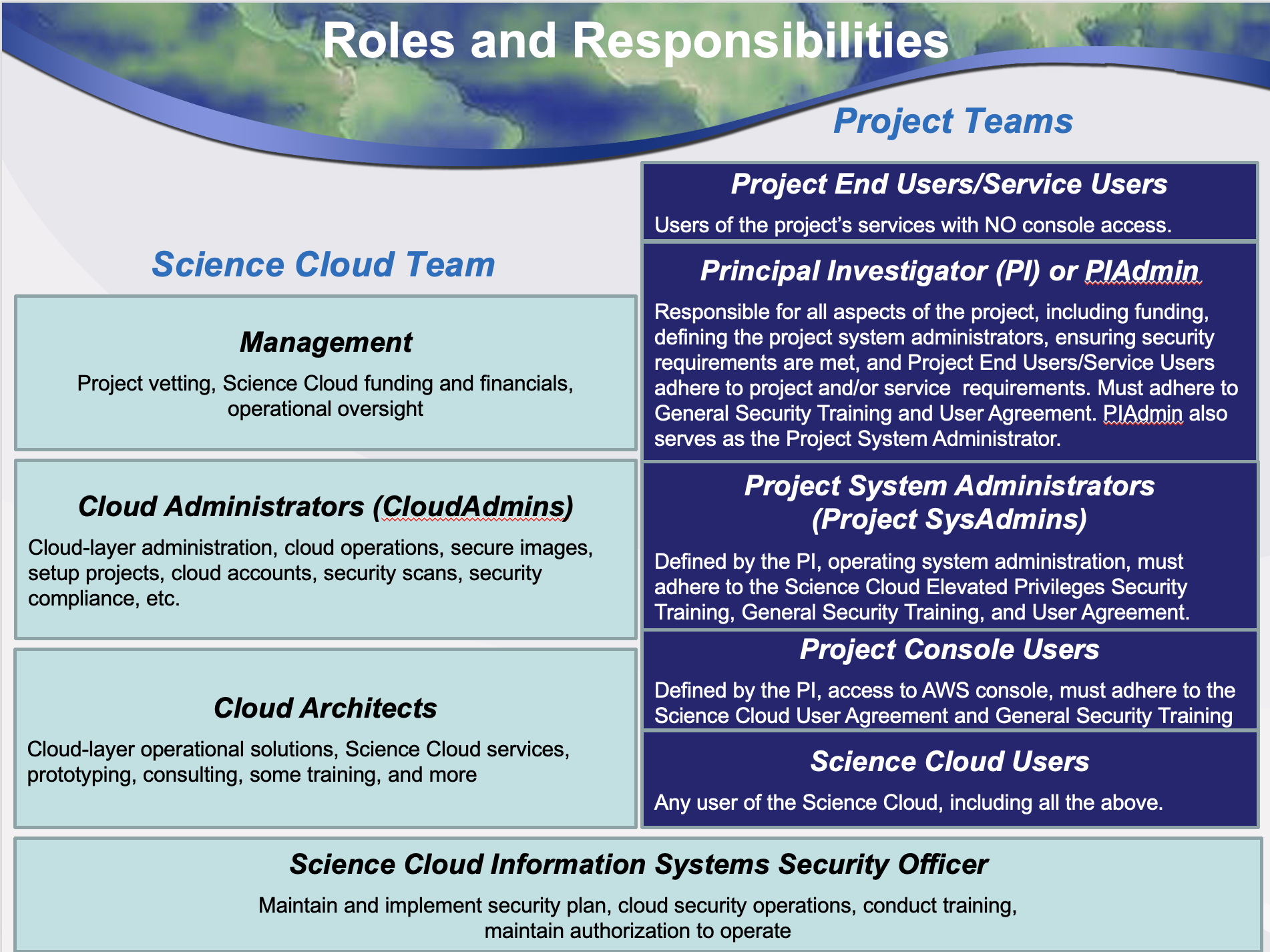
Roles and Responsibilities
User Agreements and Training Requirements
Authorization and Access
Shared Security Model
User ID, Password, and Key Expirations
Allowable Types of Data
Systems Manager and Inspector
Backups and Disaster Recovery
Incident Response
User Agreement Attestation
Project Console User Training
Acronyms
ACG | A Cloud Guru | IAM | Identity and Access Management | |
AMI | Amazon Machine Image | ISSO | Information Systems Security Officer | |
API | Application Programming Interface | ISSE | Information Systems Security Engineer | |
ATC | AWS Training and Certification | ITAR | International Traffic in Arms Regulations | |
AVM | Azure Virtual Machine | MAR | Mitigation Action Requirement | |
AWS | Amazon Web Services | MFA | Multi-Factor Authentication | |
CIS | Center for Internet Security | NIST | National Institutes of Standards and Technology | |
CUI | Controlled Unclassified Information | PI | Principal Investigator | |
CVE | Common Vulnerabilities and Exposures | RHEL | Red Hat Enterprise Linux | |
CSET | Cyber Security Engineering Team | S3 | Simple Storage Service | |
DHS | Daily Health Status | SA | Systems Administrator | |
EC2 | Elastic Compute Cloud | SCRM | Supply Chain Risk Management | |
ECR | Elastic Container Registry | SLES | SUSE Linux Enterprise Server | |
FISMA | Federal Information Management Security Act | SOC | Security Operations Center | |
KEV | Known Exploited Vulnerabilities | SSM | Systems Manager |
User Agreements and Training Requirements
Agreement or Training Module | Who Should Take This | Time Frame |
User Agreement | All console users | Annually |
General Security Training | All console users | Annually |
Elevated Privileges Security Training | PIAdmin, Project SysAdmins, CloudAdmins | Annually |
- Training is designed to help users understand current NASA security requirements and how they impact the operation of the Science Cloud
- All Users will need to work together with the Science Cloud CloudAdmin Team to implement good security practices
- Security is everyone’s responsibility!
...
Shared Security Responsibility Model
Layer | Science Cloud CloudAdmins | Project System Administrators |
Application Layer | •Monitor application authentication for security compliance and provide recommendations for remediation | •Install/configure applications in a secure fashion •Create and update passwords to meet NASA guidelines |
Container Layer | •Implement Container Registry for storage of approved Containers | •Store approved Containers in approved Container registries •Update Containers to resolve identified vulnerabilities |
O/S Layer | •Monitor instances for security compliance and provide notifications for required patches | •Use recommended AMIs/AVMs •Read and understand weekly vulnerability reports •Configure secure instances and implement patches as required |
Cloud Layer | •Recommend secure configurations and AMIs/AVMs, and Monitor Password / API key age compliance | •Coordinate with the ISSO to ensure User Agreement is attested to prior to the creation of AWS/Azure users |
Physical Layer | •AWS and Azure provide secure facilities, hardware, and other capabilities | |
Allowable Types of Data
- Data in Science Cloud must be categorized as Federal Information Security Management Act (FISMA) Low or Moderate
- Science Cloud is approved for both FISMA Low and Medium, and is appropriate for the storage and processing of public data that is openly available
- Uploading of classified, EAR, or ITAR data to the Science Cloud is strictly prohibited
- Storage of CUI is allowed provided it is protected via encryption in transit and at rest
...
- For AWS implementations, the AWS Systems Manager agent (SSM) must be installed on all EC2 instances
- AWS provides instructions for installing the SSM agent on all AWS supported operating systems at the following URL:
- https://docs.aws.amazon.com/systems-manager/latest/userguide/sysman-manual-agent-install.html
- With the SSM agent in place, vulnerabilities are continuously updated for each EC2 instance based on:
- EC2 instance state
- Installed packages
- Changes by NIST to the current Common Vulnerabilities and Exposures (CVE) information
...
- AWS provides several tools to allow any Console User to monitor current expenditures in AWS for a particular project
- AWS Cost Explorer allows for display of project costs by service, by month
- AWS Budgets can be used to set up custom budget alerts when a cost threshold has been exceeded
- AWS Cost Calculator can help you predict costs before you deploy a solution (this does not require console access):
Project Console User Training – Data Allowed in Science Cloud
...